𝐑𝐚𝐢𝐝𝐏𝐫𝐨𝐭𝐞𝐜𝐭𝐢𝐨𝐧
About Raid Protection
The ultimate base protection plugin that allows players to pay a resource in exchange for configurable protection for their base or tugboat. This plugin has been rewritten from the ground up for performance, quality, and integrating community suggested features.
Features
There are many different ways you can configure this plugin to fit the needs of your server. Many features can be modified or disabled entirely through the plugin configuration file. These include:
Both online and/or offline base protection
Trade currency for protection or provide it for free
Players can turn on/off protection
Permission based protection tiers
Configure what gets protected and who it is protected from
Set limits on how long protection lasts
Indicator(s) for displaying base protection
Option for allowing raiders to bypass protection if they can drain the protection balance with damage
Options for making protection more expensive for larger bases/clans and cheaper for small groups.
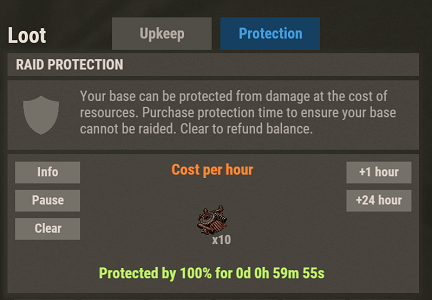
UI that blends in seamlessly with vanilla Rust.
Disclaimer
This plugin will be updated at the owners discretion. Before purchasing any plugin, I recommend checking the date of the last update and refer to support tickets to see if there might be any issues with the latest Rust game version. If a game update breaks this plugin, please open a support ticket (if it doesn't already exist) and direct message me on Discord (link found below).
How to Use
Configure the plugin and load it
Once loaded, assign yourself (or your group) one of the protection level permissions.
Place a new tool cupboard, or find one that YOU have previously placed.
Open the tool cupboard inventory, at the top you should see two tabs: "Upkeep" and "Protection". Select the protection tab to view the raid protection info.
On this screen, you will be able to spend the configured currency in order to purchase hours of protection. By default, this currency is scrap.
Use the buttons on the right to add some hours of protection, you should see that status change to show the time you are protected.
Your base will now be protected for the amount of time specified.
Notes
You can use the Clear button to withdraw all balance, and stop protection
The Pause/Resume button can be used to start/stop protection without changing the balance.
The Info button will reveal a panel which displays additional information on protection.
The +Max button will deposit the maximum amount of time that you can afford